
Transferring Web3 domains can seem daunting, but with the right guidance, it’s a straightforward process. Whether you’re moving to a new platform or transferring ownership, this step-by-step guide will walk you through everything you need to know.
By using Freename, you can ensure your domain transfer is smooth, secure, and efficient. Let’s explore how you can effortlessly transfer your Web3 domains.
Prerequisites for importing Web3 Domains
Before starting the process of transferring Web3 domains, it’s essential to have the right tools and prepare your domain properly to ensure a smooth domain import (transfer). Here’s what you need to get started.
Necessary Tools and Accounts
- Digital Wallets: To manage and transfer (import) Web3 domains, you’ll need a digital wallet that supports the relevant blockchain. Popular options include MetaMask and Trust Wallet. These wallets are essential for storing your Web3 domain and performing transactions securely. The actual ownership transfer happens through your wallet, as Web3 domains are blockchain assets.
- Access to a Web3 Domain Registrar: You’ll also need access to a Web3 domain registrar, such as Freename. While you can transfer Web3 domain NFTs directly from your wallet, Freename provides a user-friendly interface that can facilitate and display the transfer process. The Freename platform UI may offer additional verification steps, but the core transfer is always a blockchain transaction signed by your wallet. Ensure that you have an active account before proceeding.
Preparing Your Domain for Transfer
- Ensuring Domain Ownership: Before initiating a transfer, make sure you are the owner of the domain. This usually involves logging into your digital wallet and verifying that the domain is listed under your assets. If you’ve recently acquired the domain, ensure that it has been fully transferred to your wallet and is under your control.
- Checking for Transfer Restrictions: Different registrars and blockchain networks may have specific rules and restrictions regarding domain transfers. Check if there are any lock periods, restrictions, or pending obligations (like unpaid fees) that might prevent the transfer. Additionally, ensure that the domain is not currently involved in any disputes.
Step-by-Step Guide to Transfer Web3 Domains on Freename
Transferring a Web3 domain on Freename is a straightforward process, provided you follow the necessary steps. Here’s a detailed guide to help you transfer your domain seamlessly.
Prerequisite for Transferring a Web3 Domain: Minting the Domain
On Freename, when your Web3 domain is minted and appears in your wallet, you transfer ownership by signing a blockchain transaction from your wallet. The Freename platform offers a UI to initiate and confirm this transfer, which may include email verification for platform security. However, the actual transfer happens on-chain and requires you to approve it in your wallet with your private key.
Before you can transfer a domain on Freename, it must be minted. Minting is the process of registering the domain on the blockchain, ensuring it is recognized and can be transferred.
Step-by-Step Transfer Process on Freename
1. Log in to your Freename account
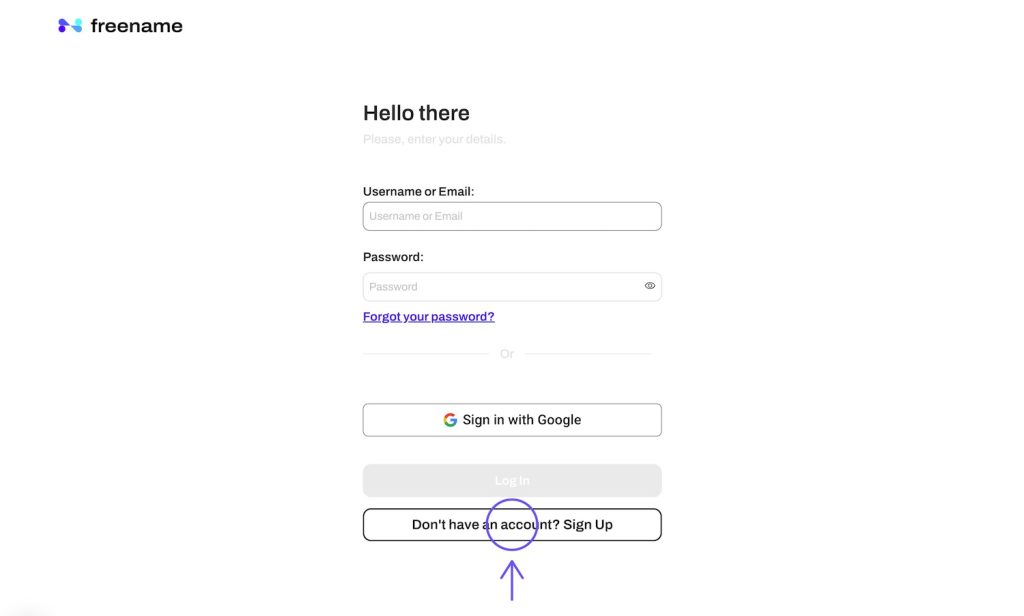
- Open your preferred web browser and navigate to the Freename website.
- Enter your username and password in the respective fields on the login page.
- Click the “Log In” button to access your account dashboard.
2. Navigate to your portfolio where all your registered domains are listed
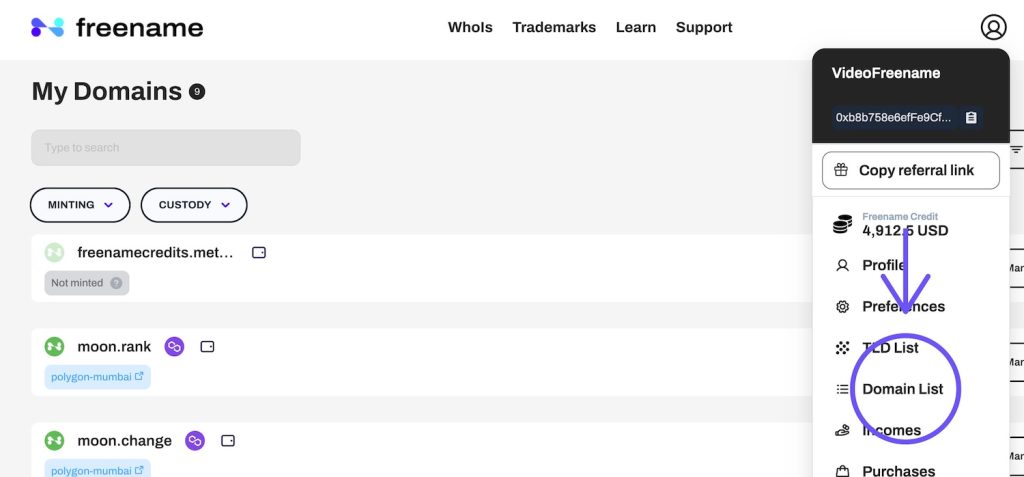
- Once logged in, locate the navigation menu on the dashboard.
- Click on the “Portfolio” tab to view a list of all the domains you currently own.
- Ensure you can see the details of each domain, including their registration status and expiration dates.
3. Choose the specific Top-Level Domain (TLD) or individual domain you wish to transfer from your portfolio

- Scroll through your portfolio to find the domain you want to transfer.
- Click on the domain name to access its detailed settings and management options.
- Verify that this is the correct domain you intend to transfer to avoid any mistakes.
4. In the transfer settings, you will be prompted to enter the recipient’s cryptocurrency wallet address
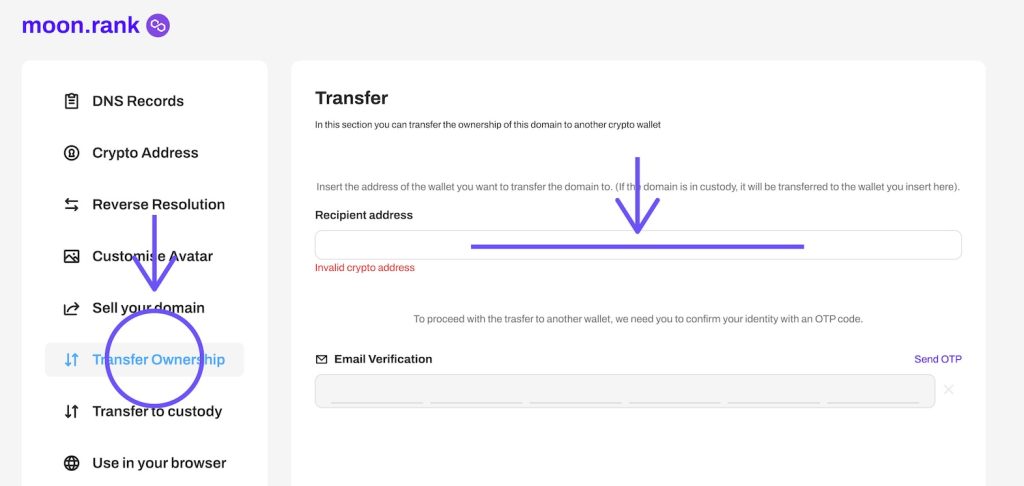
- Look for the “Transfer” or “Transfer Domain” option within the domain’s settings.
- Enter the recipient’s cryptocurrency wallet address in the designated field.
- Double-check the wallet address for accuracy to prevent any loss of assets during the transfer.
5. To confirm the transfer, an OTP (One-Time Password) code will be sent to your registered email address
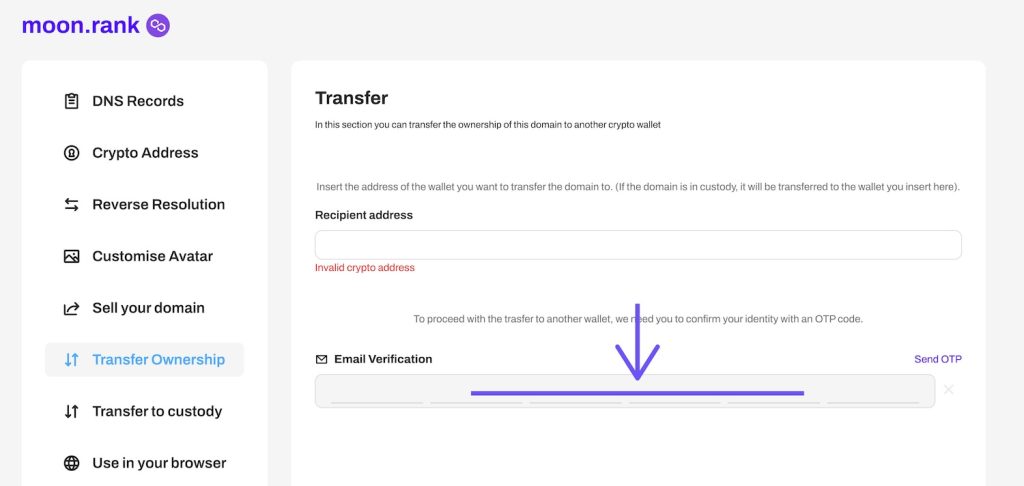
- Ensure your registered email address is accessible and up-to-date.
- Monitor your email inbox for the arrival of the OTP code sent by Freename.
- Check your spam or junk folder if you do not receive the email within a few minutes.
- Retrieve the OTP code from your email and paste it into the confirmation field on the Freename platform
- Open the email containing the OTP code sent by Freename.
- Copy the OTP code from the email.
- Return to the Freename platform and paste the code into the designated confirmation field.
- After pasting the OTP code, review all entered details to ensure they are correct.
- Click the “Submit” or “Confirm Transfer” button to complete the process.
- Wait for a confirmation message from Freename indicating that the transfer has been successfully processed.
| By following these steps, you can ensure a successful transfer of your Web3 domain to the recipient’s wallet on the Freename platform. Always double-check the recipient’s wallet address and the OTP code to avoid any errors and ensure a smooth transfer process. |
Important Considerations for Importing Web3 Domains
When transferring Web3 domains on Freename, there are several important factors to keep in mind to ensure a smooth process and future usability.
Current Limitations on Importing Transferred Domains
After transferring a domain, the recipient might encounter restrictions or challenges in integrating and utilizing the domain across different blockchain ecosystems and services. Platform compatibility varies, and not all Web3 services support all domain types. Check with both the sending and receiving platforms for specific import policies and capabilities.
Future Updates about Domain Imports
Freename creates Web3 mirrored domains from Web2 domains, but these have critical restrictions. A mirrored Web3 domain is tied to its corresponding Web2 domain and cannot be transferred or sold separately. Before attempting any transfer, verify whether your domain is a standard Web3 domain or a mirrored version, as this significantly impacts transferability.
Common Problems and Solutions
Transfer Delays
Solution: Transfer delays can occur due to network congestion on the blockchain or processing times. Blockchain congestion is the most common cause, especially on networks like Polygon during peak usage. To mitigate delays, ensure all necessary information and authorizations are provided promptly. Monitor network status and consider timing your transfers during periods of lower activity. Have sufficient gas tokens in your wallet to ensure the transaction can be processed.
Verification Issues
Verification issues often arise from incorrect or incomplete information. Double-check all entered details, including email addresses, wallet addresses, blockchain network compatibility, and authorization codes. If you encounter persistent issues, reach out to customer support for both your digital wallet and Freename. They can provide specific guidance and troubleshoot platform-specific problems versus blockchain-related issues.
Resolving Failed Transfers
Failed transfers can be frustrating, but they usually stem from either technical issues or incorrect data entry. If a transfer fails, review the error messages for specific clues. Common causes include invalid wallet addresses, insufficient funds to cover gas fees, or domain restrictions. Correct any errors and attempt the transfer again. If the problem persists, contact support for assistance.
Best Practices for Managing Web3 Domains
Effective management of Web3 domains is crucial for ensuring their security and longevity. Here are some best practices to keep your domains secure and well-maintained.
Keeping Your Wallet Secure
- Use Reputable Wallets: Always use well-known and reputable digital wallets like MetaMask, Trust Wallet, or similar options. These wallets have robust security features and are widely trusted within the Web3 community.
- Enable Two-Factor Authentication (2FA): If your wallet service offers 2FA, enable it. This adds an extra layer of security by requiring a second form of verification in addition to your password.
- Regular Updates: Keep your wallet software updated to protect against the latest security vulnerabilities. Developers regularly release updates that enhance security and functionality.
- Beware of Phishing Attacks: Always access your wallet through the official website or application. Be cautious of phishing attempts through emails or social media that may try to steal your login information.
Protecting Your Private Keys
- Store Private Keys Offline: Avoid storing your private keys on internet-connected devices. Use hardware wallets or cold storage options to keep your keys offline and secure.
- Backup Your Private Keys: Keep multiple backups of your private keys in secure locations. Consider using encrypted USB drives or other secure methods for storing these backups.
- Avoid Sharing Your Private Keys: Never share your private keys with anyone. Anyone with access to your private keys can control your domains and other digital assets.
- Use Strong, Unique Passwords: Ensure that the passwords for your wallet and any related accounts are strong and unique. Avoid using the same password across multiple platforms.
Regular Maintenance
Regularly review and update your domain information to ensure it remains accurate and up-to-date. This includes contact information, ownership details, and any associated wallet addresses. Keeping your information current helps prevent issues related to verification and transfer processes.
Mastering Web3 Domain Imports/Transfers
Transferring Web3 domains is essential for maintaining control and security over your digital assets. By following the correct procedures and adopting best practices, you can ensure a smooth and secure transfer process. Keep your digital wallets and private keys secure, regularly update domain information, and renew registrations timely. By implementing these steps, you can confidently manage and transfer your Web3 domains.
How to Import Your Web3 Domains to Freename Aftermarket
Here below you can find a short video tutorial on how to import Web3 domains (and how to import your web3 domains outside Freeame ecosystem from Unstoppable Domains and Ens domains).
Buy a Web3 Domain with Freename!
Frequently Asked Questions (FAQs)
What is a Web3 domain and how is it different from a regular domain?
A Web3 domain is a blockchain-based domain name that exists as an NFT (Non-Fungible Token) on a blockchain network. Unlike traditional Web2 domains that use DNS and are managed by centralised registrars, Web3 domains are decentralised assets you truly own through your cryptocurrency wallet. They can be used for crypto wallet addresses, decentralised websites, and digital identity. Freename offers both Web3 domains (blockchain NFTs) and traditional Web2 domain registration services.
Why should I use Freename to transfer my Web3 domain?
While you can transfer Web3 domain NFTs directly from your wallet, using Freename's platform offers several advantages. Freename provides a user-friendly interface that simplifies the transfer process, especially for users who are new to blockchain transactions. The platform displays all your registered domains in one portfolio, helps you verify which blockchain your domain is on, and offers additional security measures like OTP email verification. Freename also maintains a record of your transfer history and can provide customer support if issues arise. For users comfortable with blockchain transactions, direct wallet transfers are possible, but Freename's interface makes the process more accessible and manageable.
What does it mean to "mint" a Web3 domain on Freename?
Minting a Web3 domain means registering it on the blockchain as an NFT. When you purchase a domain in Freename's shop, it initially exists as a database record. Minting pushes that domain onto the blockchain, making it a true on-chain asset that appears in your wallet and can be transferred. Only minted domains are transferable Web3 assets. Think of minting as transforming your domain purchase into a blockchain-verified ownership certificate.
Why can't I transfer my mirrored Web3 domain?
Mirrored Web3 domains are special types of domains that Freename creates from Web2 domains. These mirrored versions are tied to their corresponding Web2 domains and cannot be transferred or sold separately. This restriction exists because the mirrored Web3 domain is linked to the ownership of the traditional Web2 domain. Before attempting to transfer any domain, verify whether it's a standard Web3 domain or a mirrored version, as this significantly impacts transferability.
Which blockchain is my Freename domain on and why does it matter?
Freename domains can be minted on multiple blockchains including Polygon, BSC (Binance Smart Chain), and Aurora. The blockchain your domain is on matters because it determines what gas token you need for transfers (MATIC for Polygon, BNB for BSC, ETH for Aurora), the speed and cost of transactions, and wallet compatibility. You can check which blockchain your domain is on in your Freename portfolio or by viewing the NFT in your wallet. Always verify the blockchain before initiating a transfer.
What should I do if my Web3 domain transfer fails?
If your transfer fails, first check the error message in your wallet or on the blockchain explorer. Common reasons include: insufficient gas fees, entering an incompatible or invalid wallet address, trying to transfer an unminted domain, attempting to transfer a mirrored domain, or blockchain network congestion. Verify all details are correct, ensure you have enough cryptocurrency for gas fees, confirm the domain is minted, and check that it's not a mirrored domain. If problems persist after corrections, contact Freename support with your transaction details and error messages.
How long does it take to transfer a Web3 domain?
The transfer time depends on the blockchain network your domain is on and current network congestion. Typically, transfers on Polygon complete in seconds to a few minutes, while other networks may take longer during peak usage times. The Freename platform verification (like OTP email confirmation) is usually instant, but the blockchain confirmation time varies. You can monitor your transaction status using your wallet or a blockchain explorer. During high network congestion, transfers may take longer and cost more in gas fees.