How to connect a Web3 domain to a website builder
If you have a minted Web3 domain, you can connect it to a website built with TypeDream, Duda, or Pagy by updating your domain’s A record. Follow this guide
If you have a minted Web3 domain, you can connect it to a website built with Duda or Pagy by updating your domain’s A record with the value provided by the website builder.
How to Connect a Web3 Domain to a Website Builder
For resolution on Chrome, Mozilla (Firefox), and other major browsers, you must have Freename DNS enabled.
Propagation can take up to 72 hours.
Requirements
- Your Web3 domain must be minted
- A published website on Duda or Pagy
- Your Web3 domain added as a custom domain inside the website builder
- The A record value provided by your website builder
- Freename DNS enabled for browser resolution
Step-by-Step
- Publish your website on Duda or Pagy, then add your Web3 domain as a custom domain inside the website builder.
- Open your Web3 domains portfolio page:
https://freename.com/dashboard/user/portfolio/?t=WEB3_SLD - Find the Web3 domain you want to use and click Manage.
- Click Records.
- If Forward Domain is enabled, disable it to allow DNS records to be active.
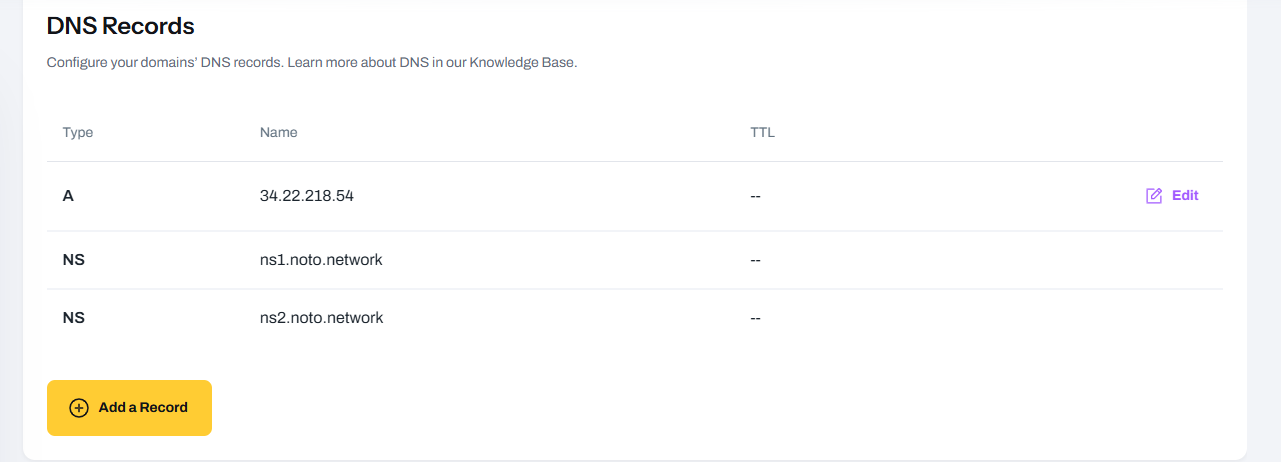
- Update the A record with the value provided by your website builder (Duda or Pagy).
- Save the change and approve it using the wallet that holds the Web3 domain.
- Wait for propagation (up to 72 hours).
- To view the website on Chrome, Mozilla, and other browsers, make sure Freename DNS is enabled, then open your domain (if needed, try using http or a final slash).
FAQ
Which record do I need to change to connect Duda or Pagy?
In most cases, you only need to update the A record using the value provided by the website builder.
Do I need to add the domain inside the website builder too?
Yes. After publishing your site, add your Web3 domain as a custom domain in Duda or Pagy, and follow their instructions to obtain the correct A record value.
Forward Domain is enabled. Why can’t I edit DNS records?
Forward Domain can override DNS behavior. Disable Forward Domain to activate DNS records and manage the A record.
Do I need to approve record changes with my wallet?
Yes. Web3 record updates require approval with the wallet that holds the domain. Make sure your wallet extension (for example, MetaMask) is active in your browser and connected to the same wallet address and chain where the domain is held. Also ensure you have enough balance to cover network fees on the chain you are using. For example, on Polygon, we recommend having at least 5 POL available for transactions.
My website does not resolve yet. How long should I wait?
Allow up to 72 hours for propagation.
My website does not work in Chrome, Mozilla, or other browsers. What should I do?
Make sure Freename DNS is enabled. If needed, try opening the domain using http or with a final slash.
Is SSL supported for Web3 domains?
At the moment, SSL is not supported for Web3 domains.
Can I build a Web3 website with my own hosting provider?
At the moment, for Web3 domains, only compatible website builders such as Duda and Pagy are supported.
I updated the A record and waited 72 hours, but it still doesn’t load. What should I do
Contact [email protected] and include your domain name, the A record value you set, and the date/time you last updated the records.
Where can I install Freename DNS?
You can currently install Freename DNS on:
- Windows: https://apps.microsoft.com/detail/xpfmjvr9kbllrq?hl=en-US&gl=US
- iOS: https://apps.apple.com/us/app/freename-dns-installer/id6477822761