How to use your Web3 domain with MetaMask
You can use your Web3 domain as a crypto payment address in MetaMask. Use a readable domain name instead of copying a long wallet address.
You can use your Web3 domain as a crypto payment address in MetaMask, so people can send funds to a readable domain name instead of copying a long wallet address.
Connect Your Web3 Domain with Metamask
Once set up, anyone who has MetaMask and the Freename Web3 Resolver (Snap) enabled can send crypto directly to your domain.
What You Need (Requirements)
- Install the MetaMask extension: https://metamask.io/download
- Install the Freename Web3 Resolver via MetaMask Snap: https://snaps.metamask.io/snap/npm/freename-resolution-snap/
- Own a Web3 domain minted on Polygon, Base, or another supported chain
- Make sure you fully control the destination wallet (you must have complete access to that wallet address)
Step-by-Step: Enable MetaMask Resolution for Your Domain
- Open your Web3 domain portfolio page:
https://freename.com/dashboard/user/portfolio/?t=WEB3_SLD - Find your domain and click Manage.
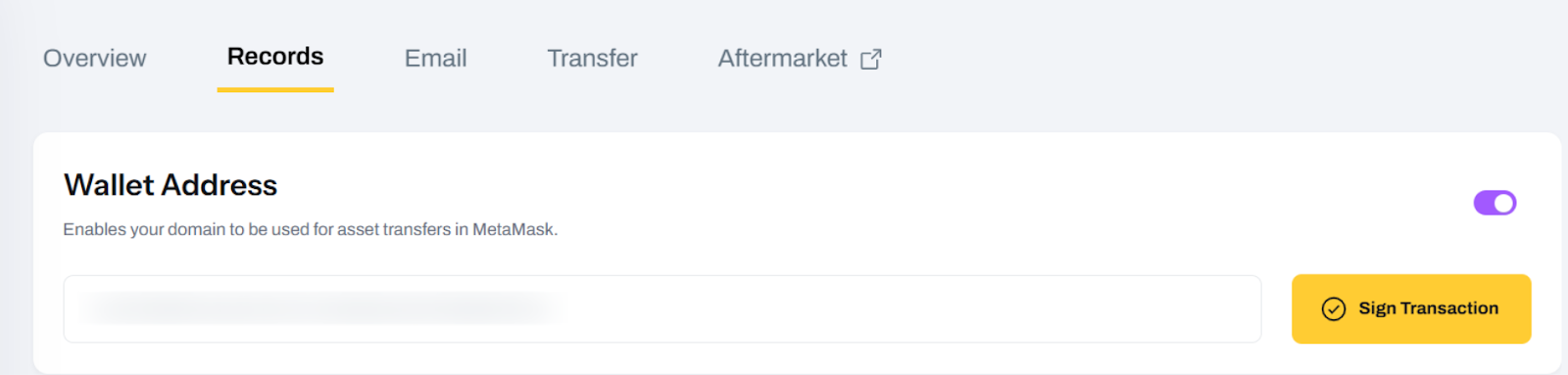
- Go to the Records section.
- In the Wallet Address area, click Sign Transaction.
- Confirm the transaction in MetaMask.
After confirmation, wait up to a few hours for the change to become active.
How Payments Work (Including Cross-Chain)
After setup, users with MetaMask + the Freename Resolver enabled can send funds to your domain name.
Important:
- This does not perform an automatic bridge.
- Funds are sent to the same wallet address linked to your domain, but on the chain selected by the sender.
Example:
- If your domain is minted on Polygon, someone can still send USDC on Base to your domain.
- You will receive the funds on Base, at the same wallet address associated with the domain.
Safety Reminder
Before using your domain for payments, confirm that:
- The wallet address linked to the domain is your own
- You have full access to that wallet (so you can actually receive and manage the funds on each chain)
FAQ
Do I need MetaMask to receive payments to my domain?
You need MetaMask to complete the setup (“Sign Transaction”). After that, you can receive funds at the linked wallet address as usual.Do senders need MetaMask too?
Yes. Senders must have MetaMask installed and the Freename Web3 Resolver (Snap) enabled to send to a Web3 domain name.How long does it take before it works?
Typically a few hours after you sign and confirm the transaction.Does Freename automatically bridge funds between chains?
No. There is no automatic bridge. Funds arrive on the chain used by the sender, at the same wallet address.I get this MetaMask error: “No address resolution found for this name.” What can I do?
Make sure you:- Completed “Sign Transaction” for that specific domain and confirmed it with your wallet
- Installed the Freename Web3 Resolver (MetaMask Snap) correctly in MetaMask
- If the issue still happens after a few hours, try using a different device or a different browser.
If it persists, contact us at [email protected].- What if I don’t control the destination wallet?
Do not proceed. Always make sure the destination wallet address is yours and you have full access to it, otherwise you may lose access to incoming funds.